Best Macro Tracking Apps (2025): Complete Guide & Reviews
Reviewed by Dr. Michael Torres, PhD
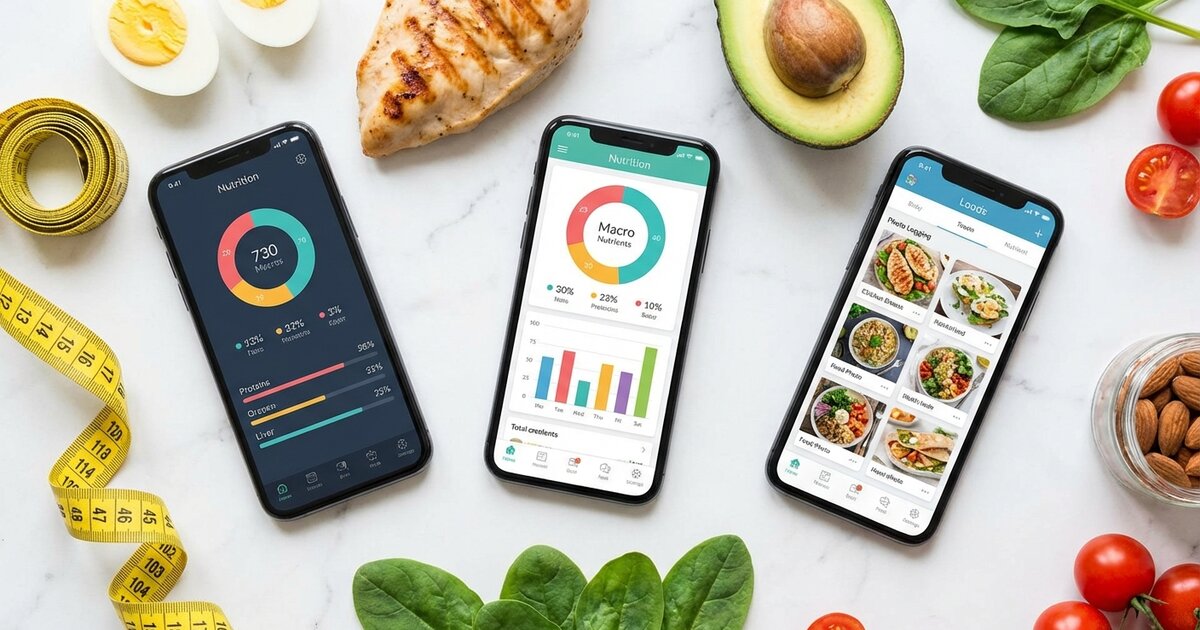
Finding the best macro tracking app can feel overwhelming. There are dozens of options, each claiming to be the ultimate solution for your nutrition goals. Some are free, some cost $20/month, and most fall somewhere in between.
Here’s the truth: the best app is the one you’ll actually use consistently. Features don’t matter if the interface frustrates you. A huge database doesn’t help if entries are inaccurate. And premium features are worthless if they don’t match your goals.
I’ve spent hundreds of hours testing every major macro tracking app on the market. This guide breaks down the 8 best options for 2025, with honest pros and cons, real pricing information, and specific recommendations based on your goals. Whether you’re a complete beginner learning how to count macros or an experienced athlete optimizing performance, there’s a perfect app for you. For comprehensive tracking strategies beyond just app selection, see our complete guide to tracking your macros.
Before diving in, make sure you know your macro targets. Our free Macro Calculator gives you personalized numbers in under 60 seconds.

Quick Comparison: Best Macro Tracking Apps at a Glance
Before we dive into detailed reviews, here’s how the top apps stack up:
| App | Best For | Database Size | Free Version | Premium Price | Our Rating |
|---|---|---|---|---|---|
| MyFitnessPal | Largest database, social features | 14+ million | Yes (with ads) | $19.99/month | 4.3/5 |
| Cronometer | Accuracy, micronutrients | 1+ million (verified) | Yes | $9.99/month | 4.6/5 |
| MacroFactor | Adaptive coaching, serious trackers | 2+ million | No | $11.99/month | 4.8/5 |
| Carbon Diet Coach | Goal-based coaching | 1.5+ million | No | $9.99/month | 4.5/5 |
| Lose It! | Weight loss, simplicity | 7+ million | Yes | $19.99/year | 4.2/5 |
| MyPlate | Beginners, simplicity | 2+ million | Yes | $9.99/month | 4.0/5 |
| Fitbit | Fitbit device users | 3+ million | Yes (with device) | $9.99/month | 4.1/5 |
| Nutritionix Track | Restaurant meals, voice logging | 1+ million | Yes | $8.99/month | 4.2/5 |
Quick Recommendations:
- Best Overall: MacroFactor
- Best Free: Cronometer
- Best for Beginners: Lose It! or MyPlate
- Best Database: MyFitnessPal
- Best for Serious Athletes: MacroFactor or Carbon Diet Coach
Now let’s dive into the detailed reviews.
1. MyFitnessPal — Best for Database Size & Social Features

Rating: 4.3/5 ⭐⭐⭐⭐
MyFitnessPal is the grandfather of macro tracking apps. With over 200 million users and the largest food database in the world, it’s where most people start their tracking journey. If you’ve ever googled “macro tracking app,” you’ve probably already downloaded it.
Features Overview
MyFitnessPal offers everything you’d expect from a mature nutrition app:
- Massive food database: Over 14 million foods, including restaurant meals, packaged products, and recipes
- Barcode scanner: Scan almost any packaged food and it’s in the database
- Recipe importer: Paste a URL and it calculates the macros
- Meal planning: Save frequent meals for quick logging
- Social features: Add friends, share progress, join community groups
- Exercise tracking: Log workouts and adjust calorie goals
- Third-party integrations: Connects with 50+ apps and devices (Fitbit, Garmin, Strava, Apple Health)
The interface is clean and intuitive. Adding foods is fast—typically 2-3 taps using recent foods, favorites, or barcode scanning.
Pros
✅ Largest database: If a food exists, it’s probably in MyFitnessPal. This means less manual entry and faster logging.
✅ Strong social features: Connect with friends, share diary entries, and stay accountable. Great motivation for some users.
✅ Extensive integrations: Works with virtually every fitness tracker, smart scale, and workout app on the market.
✅ Recipe import: Paste any recipe URL and get automatic macro calculations—a huge time saver.
✅ Established and reliable: The app is mature, stable, and well-documented with extensive support resources.
Cons
❌ Database accuracy issues: Because entries are user-submitted, many contain errors. You might find three entries for the same food with wildly different macros. Always verify suspicious entries.
❌ Aggressive upselling: The free version constantly pushes premium subscriptions with pop-ups and limited features.
❌ Premium is expensive: At $19.99/month ($79.99/year), it’s one of the pricier options for what you get.
❌ Basic macro features: No adaptive algorithms or smart coaching—just a static diary.
❌ Privacy concerns: Under Armor (parent company) has had data breaches in the past.
Pricing
| Plan | Cost | Key Features |
|---|---|---|
| Free | $0 | Basic tracking, ads, limited insights |
| Premium Monthly | $19.99/month | Ad-free, food verification, nutrient timing |
| Premium Yearly | $79.99/year (~$6.67/month) | All premium features |
Best For
MyFitnessPal is ideal for:
- Beginners who want a familiar, well-documented app
- Social trackers who are motivated by community and friends
- People who eat lots of packaged/restaurant foods (best barcode coverage)
- Users with multiple fitness devices (best integration ecosystem)
User Rating
- App Store: 4.6/5 (2.3M reviews)
- Google Play: 4.3/5 (2.1M reviews)
Bottom line: MyFitnessPal is the safe, popular choice. The database is unmatched for convenience, but accuracy concerns and aggressive monetization hold it back. If you go with MFP, always verify database entries and consider the yearly subscription for better value.
2. Cronometer — Best for Accuracy & Micronutrients

Rating: 4.6/5 ⭐⭐⭐⭐⭐
If accuracy is your top priority, Cronometer is your app. While other apps rely on user-submitted data riddled with errors, Cronometer uses a curated, verified database sourced primarily from the USDA and direct manufacturer submissions. It’s the gold standard for data quality.
Features Overview
Cronometer is designed for people who want precision:
- Verified food database: Over 1 million foods with accurate, sourced nutritional data
- Complete micronutrient tracking: Track 82 nutrients including vitamins, minerals, amino acids, and more
- Biometric tracking: Log weight, body fat, blood pressure, blood glucose, and other health markers
- Custom foods and recipes: Create detailed entries with complete nutritional information
- Fasting timer: Built-in intermittent fasting support
- Export features: Download your data as CSV for personal analysis
- Health app integrations: Syncs with Apple Health, Google Fit, Fitbit, and Garmin
The interface is more clinical than MyFitnessPal—less pretty, more functional. Data nerds will love it; casual users might find it overwhelming.
Pros
✅ Most accurate database: Verified entries mean you can trust the numbers. No more second-guessing if that chicken breast entry is correct.
✅ Micronutrient tracking: See exactly where you’re deficient in vitamins and minerals—crucial for optimizing health beyond just macros.
✅ Excellent free tier: Unlike competitors, the free version is genuinely useful with full macro tracking capabilities.
✅ Clean data exports: Perfect for people who want to analyze their nutrition in spreadsheets or share with healthcare providers.
✅ No social features (pro for some): If you want a private, focused tracking experience without social noise, Cronometer delivers.
Cons
❌ Smaller database: Fewer entries means more manual food creation for obscure items. Common foods are well-covered; niche products may require work.
❌ Limited restaurant coverage: Fast food and chain restaurants are represented, but local restaurant data is sparse.
❌ Learning curve: The detailed interface takes time to master. Beginners may feel overwhelmed by 82 trackable nutrients.
❌ Sparse social features: No friends, no community, no accountability partners. If social motivation helps you, look elsewhere.
❌ Clinical aesthetic: The interface prioritizes function over form. It’s not ugly, but it’s not Instagram-worthy either.
Pricing
| Plan | Cost | Key Features |
|---|---|---|
| Free | $0 | Full macro tracking, limited micronutrient insights |
| Gold Monthly | $9.99/month | Advanced analysis, no ads, custom charts |
| Gold Yearly | $49.99/year (~$4.17/month) | All Gold features, best value |
Best For
Cronometer is ideal for:
- Data-driven trackers who want verified, accurate information
- Health optimizers tracking micronutrients beyond just macros
- People with dietary restrictions who need precise nutrient tracking
- Privacy-conscious users who want a no-nonsense tracking experience
- Budget-conscious trackers who want powerful free features
User Rating
- App Store: 4.7/5 (43K reviews)
- Google Play: 4.4/5 (35K reviews)
Bottom line: Cronometer is the accuracy king. If you care about data quality over database size, it’s the best choice—especially considering the generous free tier. The learning curve is worth it for serious trackers.
For more on accurate tracking techniques, see our guide on common macro tracking mistakes to avoid.
3. MacroFactor — Best Overall for Serious Trackers

Rating: 4.8/5 ⭐⭐⭐⭐⭐
MacroFactor is what happens when exercise scientists build a macro tracking app. Created by the team behind Stronger By Science (one of the most respected evidence-based fitness resources), MacroFactor isn’t just a food diary—it’s an intelligent coaching system that learns your metabolism and adapts your targets automatically.
Features Overview
MacroFactor takes a fundamentally different approach:
- Adaptive TDEE algorithm: Calculates your true energy expenditure from your actual data—weight trends + food intake—and adjusts weekly
- Smart macro recommendations: Automatically adjusts targets based on your progress toward goals
- High-quality food database: Curated entries with aggressive error detection
- Flexible logging: Quick-add options, AI food recognition, barcode scanning
- Detailed analytics: See your TDEE trends, expenditure estimates, and progress over time
- Collaborative coaching mode: Share data with coaches for remote guidance
- No calorie “earning”: Doesn’t adjust calories for exercise—uses real data instead
The magic is in the algorithm. Instead of guessing your TDEE from a formula, MacroFactor calculates it from what you actually eat and how your weight responds. After 2-3 weeks of data, it knows your metabolism better than any calculator.
Pros
✅ Adaptive algorithm is game-changing: No more guessing if your calories are right. The app tells you, based on real data, and adjusts automatically.
✅ Scientifically-backed: Built by actual researchers who publish peer-reviewed studies. The methodology is transparent and evidence-based.
✅ Excellent food logging UX: Despite the sophisticated backend, logging is fast and intuitive. The team obsesses over reducing friction.
✅ No “earn your food” nonsense: Doesn’t add calories for exercise, which leads to overeating. Relies on real metabolic data instead.
✅ Weekly check-ins: Prompts you to weigh in and adjusts recommendations—like having a nutrition coach in your pocket.
Cons
❌ No free tier: You must pay to use MacroFactor. There’s a free trial, but no permanent free option.
❌ Algorithm needs time: The adaptive features require 2-3 weeks of consistent data to become accurate. You must be patient.
❌ Requires weigh-ins: The algorithm needs regular weight data. If you have scale anxiety, this could be challenging.
❌ Smaller social features: No friend connections or community forums (though this may be a pro for focused trackers).
❌ iPhone-forward: While Android is supported, iOS tends to get features first.
Pricing
| Plan | Cost | Key Features |
|---|---|---|
| Monthly | $11.99/month | Full access to all features |
| Yearly | $71.99/year (~$6/month) | All features, 50% savings |
| Free Trial | 7 days | Complete access to evaluate |
Best For
MacroFactor is ideal for:
- Serious trackers who have plateaued with basic apps
- Data lovers who want to understand their true metabolism
- Dieters who’ve failed calorie formulas and need real numbers
- Athletes in bulking, cutting, or maintenance phases
- People willing to invest in the best tracking experience
User Rating
- App Store: 4.8/5 (8.5K reviews)
- Google Play: 4.6/5 (3.2K reviews)
Bottom line: MacroFactor is the most sophisticated macro tracking app available. The adaptive algorithm genuinely works and removes the guesswork that frustrates many trackers. If you’re serious about results and willing to pay, it’s our top recommendation.
Understanding your metabolism is crucial—learn more about TDEE and how it affects your macros.
4. Carbon Diet Coach — Best for Goal-Based Coaching

Rating: 4.5/5 ⭐⭐⭐⭐⭐
Carbon Diet Coach comes from Layne Norton, PhD—a renowned nutrition researcher and natural bodybuilding champion. Like MacroFactor, Carbon uses adaptive algorithms, but positions itself more explicitly as a “coach” that gives specific recommendations based on your goals.
Features Overview
Carbon focuses on guided coaching:
- Goal-based setup: Choose from fat loss, muscle gain, or maintenance with specific timeline targets
- Adaptive algorithm: Learns your metabolism and adjusts macros weekly based on progress
- Check-in system: Weekly prompts to report weight and adherence, with specific recommendations
- Diet coaching advice: The app explains WHY it’s making recommendations, teaching you in the process
- Reverse dieting support: Excellent for post-diet metabolic recovery
- Refeed and diet break programming: Built-in strategies for sustainability
- Macro cycling options: Support for carb cycling and calorie cycling approaches
Carbon feels more like working with a human coach than using an app. It explains its reasoning, adjusts for life circumstances, and provides structured guidance.
Pros
✅ Educational approach: Carbon teaches you nutrition principles while coaching you. You learn why adjustments happen.
✅ Excellent for cutting/bulking cycles: Built with physique athletes in mind, with specific protocols for different phases.
✅ Reverse dieting excellence: One of the best tools for recovering metabolism after aggressive diets.
✅ Personalized recommendations: Doesn’t just track—actively tells you what to do based on your data.
✅ Created by a credible expert: Layne Norton’s research background lends credibility to the algorithms.
Cons
❌ No free tier: Must subscribe to use any features. Free trial available but limited.
❌ Smaller food database: Not as comprehensive as MyFitnessPal; more manual entry for obscure foods.
❌ Can feel rigid: The coaching approach means the app makes decisions for you, which some users find restrictive.
❌ Less detailed logging analytics: Focus is on coaching rather than granular data export.
❌ Physique athlete focus: General users may find some features overkill for simple weight management.
Pricing
| Plan | Cost | Key Features |
|---|---|---|
| Monthly | $9.99/month | Full coaching features |
| Yearly | $79.99/year (~$6.67/month) | All features, best value |
| Free Trial | 7 days | Full access to evaluate |
Best For
Carbon Diet Coach is ideal for:
- Physique competitors preparing for shows or photo shoots
- Yo-yo dieters who need structured reverse dieting
- People who want guidance, not just tracking
- Users who respond to coaching and structure
- Anyone interested in Layne Norton’s methodology
User Rating
- App Store: 4.7/5 (12K reviews)
- Google Play: 4.5/5 (5.8K reviews)
Bottom line: Carbon is MacroFactor’s main competitor in the adaptive coaching space. It’s slightly more prescriptive and coach-like, which some users love and others find limiting. Excellent for physique goals and reverse dieting specifically.
5. Lose It! — Best for Simplicity & Weight Loss Focus

Rating: 4.2/5 ⭐⭐⭐⭐
Lose It! takes the opposite approach from feature-heavy apps. It’s designed to be simple, friendly, and focused on one thing: helping you lose weight. The macro tracking is solid, but the app’s strength is its accessibility for beginners.
Features Overview
Lose It! prioritizes ease of use:
- Simple onboarding: Set your goal weight and timeline; the app calculates everything
- Clean interface: Uncluttered design that doesn’t overwhelm
- Barcode scanner: Quick logging of packaged foods
- Snap It feature: AI-powered food recognition from photos (premium)
- Goals and challenges: Gamification elements to maintain motivation
- Social features: Connect with friends, join challenges
- Device integrations: Syncs with fitness trackers and Apple Health
The experience feels friendly and encouraging rather than clinical. It’s designed for people who find nutrition tracking intimidating.
Pros
✅ Extremely user-friendly: The learning curve is nearly zero. Download, setup, start tracking within minutes.
✅ Great free tier: Basic calorie and macro tracking is fully functional without paying.
✅ Affordable premium: At $19.99/year (not month), premium is accessible for most budgets.
✅ Motivational approach: Focuses on positive reinforcement and progress celebration.
✅ Solid database: 7+ million foods with decent accuracy for common items.
Cons
❌ Less macro-focused: Calories are primary; macro tracking feels secondary compared to dedicated apps.
❌ Basic analytics: Limited insights compared to Cronometer or MacroFactor.
❌ Photo recognition hit-or-miss: Snap It AI feature requires premium and isn’t always accurate.
❌ No adaptive features: Static calorie/macro goals without intelligent adjustments.
❌ Can feel juvenile: The encouraging tone and gamification may feel patronizing to experienced users.
Pricing
| Plan | Cost | Key Features |
|---|---|---|
| Free | $0 | Basic calorie/macro tracking |
| Premium Yearly | $19.99/year | Snap It, meal planning, patterns |
| Premium Lifetime | $99.99 one-time | All features forever |
Best For
Lose It! is ideal for:
- Complete beginners intimidated by complex apps
- Weight loss focused users who don’t need advanced macro features
- Budget-conscious trackers (best premium value)
- People who respond to gamification and positive reinforcement
- Casual trackers who want something simple
User Rating
- App Store: 4.7/5 (890K reviews)
- Google Play: 4.4/5 (380K reviews)
Bottom line: Lose It! is the friendliest app on this list. It won’t satisfy data nerds or serious athletes, but for beginners focused on weight loss, it’s an excellent starting point.
6. MyPlate by Livestrong — Best Budget-Friendly Option

Rating: 4.0/5 ⭐⭐⭐⭐
MyPlate (formerly Livestrong Calorie Tracker) is a straightforward, no-frills option that covers the basics well. It’s not the most sophisticated, but it’s reliable, affordable, and gets the job done for general macro tracking.
Features Overview
MyPlate focuses on fundamentals:
- Clean food logging: Simple interface for tracking meals
- Food database: 2+ million foods from USDA and user submissions
- Barcode scanner: Standard scanning functionality
- Basic analytics: Daily and weekly macro summaries
- Water tracking: Monitor hydration alongside nutrition
- Exercise logging: Track workouts and calorie adjustments
- Goal setting: Simple weight and nutrition goals
The app feels like a reliable workhorse—nothing fancy, but dependable for daily tracking.
Pros
✅ Very affordable: Premium is only $9.99/month, with a generous free tier.
✅ Simple and clean: No feature bloat or overwhelming options.
✅ USDA data backbone: Core database entries are reliable.
✅ Water tracking built-in: Convenient for users who want hydration monitoring.
✅ Livestrong content integration: Access to articles and guides within the app.
Cons
❌ Dated interface: The design feels older compared to competitors.
❌ Smaller database: May require more manual entries for specialty foods.
❌ Limited advanced features: No adaptive algorithms, minimal analytics.
❌ Less active development: Updates are less frequent than competitors.
❌ Mixed database quality: User-submitted entries can be inaccurate.
Pricing
| Plan | Cost | Key Features |
|---|---|---|
| Free | $0 | Basic tracking with ads |
| Premium Monthly | $9.99/month | Ad-free, advanced features |
| Premium Yearly | $29.99/year (~$2.50/month) | All features, best value |
Best For
MyPlate is ideal for:
- Budget-conscious users who want affordable premium features
- Simple trackers who don’t need advanced analytics
- Beginners who want straightforward logging
- Livestrong content readers familiar with the brand
User Rating
- App Store: 4.5/5 (78K reviews)
- Google Play: 4.2/5 (45K reviews)
Bottom line: MyPlate is a solid, affordable option for basic macro tracking. It won’t wow you with features, but it reliably handles the fundamentals at a great price point.
7. Fitbit — Best for Fitbit Device Users

Rating: 4.1/5 ⭐⭐⭐⭐
If you already wear a Fitbit, using the Fitbit app for nutrition tracking makes sense. The integration between activity and food is seamless, and having everything in one place simplifies your tracking ecosystem.
Features Overview
Fitbit offers integrated health tracking:
- Seamless device integration: Activity, sleep, and nutrition in one app
- Food database: 3+ million foods with barcode scanning
- Automatic calorie adjustments: Burned calories from activity adjust daily goals
- Macro tracking: Set and track protein, carbs, and fat targets
- Water and weight logging: Complete health picture
- Premium insights: Advanced analytics and guided programs (Premium subscription)
- Social features: Challenges and friends leaderboards
The app works best as part of the Fitbit ecosystem rather than as a standalone nutrition tracker.
Pros
✅ Perfect Fitbit integration: No syncing hassles; everything is unified.
✅ Activity-adjusted goals: Daily calorie targets adjust based on actual movement.
✅ Comprehensive health picture: See nutrition alongside sleep, activity, and heart rate.
✅ Good free tier: Basic tracking is included with any Fitbit device.
✅ Established ecosystem: Large user base, reliable development, strong support.
Cons
❌ Requires Fitbit device for best experience: Standalone use is limited.
❌ Nutrition is secondary focus: Activity tracking takes priority; food features feel like an add-on.
❌ “Earn your food” mentality: Adjusting calories for exercise can lead to overeating.
❌ Premium required for advanced features: Best insights locked behind $9.99/month subscription.
❌ Database accuracy varies: Mix of verified and user-submitted entries.
Pricing
| Plan | Cost | Key Features |
|---|---|---|
| Free (with device) | $0 | Basic tracking, limited insights |
| Premium Monthly | $9.99/month | Detailed analytics, guided programs |
| Premium Yearly | $79.99/year (~$6.67/month) | All premium features |
Best For
Fitbit is ideal for:
- Existing Fitbit users who want unified tracking
- Activity-focused trackers who want nutrition as a supplement
- People who prefer one-app ecosystems
- Users who already pay for Fitbit Premium
User Rating
- App Store: 4.5/5 (1.2M reviews)
- Google Play: 4.0/5 (1.8M reviews)
Bottom line: Fitbit is excellent if you’re already in the Fitbit ecosystem. As a standalone macro tracker, it’s outclassed by dedicated apps, but the seamless integration justifies its use for device owners.
8. Nutritionix Track — Best for Restaurant Meals & Voice Logging

Rating: 4.2/5 ⭐⭐⭐⭐
Nutritionix Track stands out with two killer features: the most comprehensive restaurant database and natural language voice logging. Say “I ate a chipotle burrito bowl with chicken” and it logs everything automatically.
Features Overview
Nutritionix offers unique logging methods:
- Natural language input: Type or speak meals in plain English
- Extensive restaurant database: Accurate data for thousands of restaurants
- Voice logging: Speak your meals hands-free
- Professional food database: Powered by Nutritionix’s commercial-grade data
- Verified restaurant nutrition: Direct partnerships with chains for accurate data
- Simple interface: Clean, focused design
- API-powered: Same data used by healthcare providers
The voice logging is genuinely impressive. “Two eggs, three strips of bacon, and a slice of wheat toast” becomes a complete logged meal.
Pros
✅ Best restaurant coverage: If you eat out frequently, Nutritionix has the most accurate chain restaurant data.
✅ Voice logging is magical: Speaking meals is faster than any other logging method.
✅ Natural language processing: Log complex meals in plain English without searching foods individually.
✅ Professional-grade data: The same database used by hospitals and dietitians.
✅ Clean, focused experience: Does one thing well rather than everything mediocrely.
Cons
❌ Limited advanced features: No adaptive algorithms, basic analytics.
❌ Smaller feature set: Fewer bells and whistles than competitors.
❌ Voice recognition requires internet: Natural language features need connectivity.
❌ Less community: Smaller user base means fewer social features.
❌ Premium required for best features: Free tier is quite limited.
Pricing
| Plan | Cost | Key Features |
|---|---|---|
| Free | $0 | Basic logging, limited voice |
| Pro Monthly | $8.99/month | Full voice, restaurant data |
| Pro Yearly | $59.99/year (~$5/month) | All features |
Best For
Nutritionix Track is ideal for:
- Frequent restaurant diners who need accurate chain data
- Busy people who want the fastest possible logging
- Voice input enthusiasts who hate typing
- Healthcare professionals using verified nutrition data
- People with accessibility needs who benefit from voice logging
User Rating
- App Store: 4.6/5 (12K reviews)
- Google Play: 4.3/5 (8K reviews)
Bottom line: Nutritionix Track fills a specific niche brilliantly. If you eat out often or want voice logging, it’s unmatched. For home cooking and advanced features, other apps serve better.
For tips on tracking restaurant meals regardless of app, see our guide on eating out while tracking macros.
How to Choose the Right Macro Tracking App
With eight solid options, picking the right one depends on your specific needs. Here’s a decision framework:
Consider Your Primary Goal
Weight loss focus: Lose It!, MyFitnessPal, or MacroFactor Muscle building: MacroFactor, Carbon Diet Coach, or Cronometer General health optimization: Cronometer (for micronutrients) Competition prep: Carbon Diet Coach or MacroFactor
Consider Your Experience Level
Complete beginner: Lose It! or MyPlate Intermediate tracker: MyFitnessPal or Cronometer Advanced/serious: MacroFactor or Carbon Diet Coach
Consider Your Budget
Free is essential: Cronometer (best free tier) Budget-conscious: Lose It! ($19.99/year) or MyPlate ($29.99/year) Willing to invest: MacroFactor ($71.99/year) or Carbon ($79.99/year)
Consider Your Eating Patterns
Lots of packaged foods: MyFitnessPal (biggest barcode database) Frequent restaurant meals: Nutritionix Track or MyFitnessPal Home cooking focus: Cronometer or MacroFactor Meal prep routines: Any app with saved meals feature
Consider Your Device Ecosystem
Fitbit user: Fitbit app Apple Watch user: Cronometer or MacroFactor (best HealthKit integration) Multiple devices: MyFitnessPal (most integrations)
Our Recommendation Flowchart
- Are you serious about results and willing to pay? → MacroFactor
- Want the best free experience? → Cronometer
- Complete beginner nervous about tracking? → Lose It!
- Eat out constantly? → Nutritionix Track
- Own a Fitbit? → Fitbit app
- Want the biggest database? → MyFitnessPal
- Want structured coaching? → Carbon Diet Coach
- Want simple and cheap? → MyPlate
Once you choose an app, our guide on how to hit your macros will help you actually reach your targets consistently.
Free vs. Paid Macro Tracking Apps: Is Premium Worth It?
This is the million-dollar question (or rather, the $100/year question). Here’s an honest assessment:
What Free Versions Offer
Every major app offers free macro tracking. You can log food, track macros, and see daily summaries without paying anything. For basic tracking, free is genuinely sufficient.
Best free experiences:
- Cronometer — Full macro tracking, limited micronutrient insights, minimal ads
- Lose It! — Complete calorie/macro logging, some ads
- MyFitnessPal — Full tracking, noticeable ads and upselling
What Premium Actually Adds
Premium features vary by app but typically include:
- Ad-free experience: Worth it if ads drive you crazy
- Advanced analytics: Trends, patterns, insights over time
- Food verification: Flagging suspicious database entries
- Adaptive algorithms: MacroFactor and Carbon’s killer feature (not available free anywhere)
- Barcode priority: Some apps limit free barcode scans
- Nutrient timing: When you eat, not just what
- Export features: Download your data
When Premium Is Worth It
✅ You’ve plateaued with free apps: Adaptive algorithms in MacroFactor/Carbon can break through stalls
✅ You track daily, long-term: Annoyance of ads compounds over months; premium quality of life improves
✅ You want coaching, not just tracking: Premium apps with algorithms actually guide you
✅ You can afford it: $6-12/month is less than one meal out
When Free Is Fine
✅ You’re just starting: Learn the basics before investing
✅ You track intermittently: If you only track a few weeks per year, free is sufficient
✅ You’re budget-constrained: Free apps are fully functional; premium is a luxury
✅ You already know your body: If your current approach works, why pay for features you won’t use?
The Math
Let’s be real: MacroFactor at $72/year is $6/month. A single session with a registered dietitian costs $100-200. If the adaptive algorithm helps you lose 5 extra pounds, it’s paid for itself in results (and you avoid the yo-yo of guessing).
Our take: Start free with Cronometer to learn tracking fundamentals. If you get serious and plateau, upgrade to MacroFactor or Carbon. Don’t pay for MyFitnessPal Premium—the value isn’t there compared to dedicated coaching apps.
Tips for Using Macro Tracking Apps Effectively
Choosing the right app is just the start. Here’s how to actually succeed with macro tracking:
1. Log Before You Eat
Enter food before eating, not after. This serves two purposes:
- You can adjust portions if something doesn’t fit
- You won’t forget to log and underestimate later
2. Use a Food Scale (At Least Initially)
Studies show people underestimate portions by 30-50%. A $15 digital scale pays for itself in accuracy. Weigh everything for the first few weeks; you’ll calibrate your eyeballs.
3. Verify Database Entries
Especially in MyFitnessPal, always sanity-check entries. Does that chicken breast really have 50g protein per ounce? (No.) If something looks wrong, search for a verified entry or create your own.
4. Save Your Frequent Meals
If you eat the same breakfast daily, save it as a meal. One-tap logging dramatically improves consistency.
5. Don’t Aim for Perfection
Hitting macros within 5-10% is success. Obsessing over exact numbers leads to burnout. Close is good enough for results.
6. Track Consistently, Not Perfectly
A week of imperfect tracking beats three days of perfect tracking followed by giving up. Consistency trumps precision.
7. Use the Barcode Scanner
It’s faster and more accurate than searching. Scan everything that has a barcode.
8. Plan Protein First
Build meals around protein since it’s hardest to hit. The best high-protein foods make this easier.
9. Review Your Patterns Weekly
Look at weekly averages, not daily fluctuations. One high day doesn’t ruin a week of consistency.
10. Give It Two Weeks
The first week of tracking sucks. By week two, it becomes routine. Don’t quit before the habit forms.
Common Mistakes to Avoid
Learning from others’ failures saves you time:
1. Not Weighing Food
“A cup of rice” varies wildly depending on how you pack it. Weight measurements are objective; volume measurements are not.
2. Forgetting Cooking Oils
That tablespoon of olive oil you cooked with is 120 calories and 14g fat. It counts.
3. Ignoring “BLTs” (Bites, Licks, Tastes)
The handful of chips, the taste of sauce, the bite of your kid’s meal—these add up. Log them or account for a buffer.
4. Choosing Incorrect Database Entries
“Chicken breast” could be raw, cooked, with skin, without skin, fried, or grilled. Be specific.
5. Not Adjusting for Reality
If you’ve tracked for four weeks and nothing’s changing, your numbers need adjustment. An app can’t force your body to respond; it can only record what you report.
6. Obsessing Over Daily Numbers
Weight fluctuates. Macros don’t need to be perfect every day. Focus on weekly averages and trends.
7. Tracking Without a Plan
Logging random food isn’t a strategy. Use our Macro Calculator to get real targets, then track toward them.
For a deeper dive, see our complete guide on common macro tracking mistakes.
Related Guide: Part of our How to Count Macros guide.
Final Recommendations
After testing every major app, here’s the verdict:
Best Overall: MacroFactor
The adaptive algorithm changes the game. It removes guesswork, learns your metabolism, and adjusts automatically. For anyone serious about results, it’s worth the investment.
Best Free: Cronometer
Accurate, verified data with a genuinely useful free tier. The gold standard for data quality on a budget.
Best for Beginners: Lose It!
Simple, friendly, and encouraging. Perfect for people intimidated by complex apps.
Best Database: MyFitnessPal
When sheer coverage matters—packaged foods, restaurants, international items—nothing beats MFP’s 14+ million entries.
Best for Athletes: MacroFactor or Carbon Diet Coach
Both offer the adaptive coaching and phase-specific features serious athletes need.
Best for Restaurant Diners: Nutritionix Track
The voice logging and restaurant database are unmatched.
Start Tracking Today
The best macro tracking app is the one you’ll use consistently. Pick one from this list, download it, and log your next meal. Imperfect action beats perfect planning.
Need your macro targets first? Our Macro Calculator gives you personalized numbers based on your goals in under a minute. For a complete breakdown of the tracking process, read our how to count macros guide.
Not sure where to start with nutrition? Read our complete guide on what macronutrients are and why they matter.
Already tracking but struggling to hit your numbers? Check out our guide on macro-friendly meals for practical ideas.
Ready to take your tracking to the next level? Learn how to meal prep for macros to make hitting your targets effortless.
Your nutrition journey is unique. The right app makes it easier—but you’re the one who makes it happen. Start today.
Related Articles
Travel Macros: How to Track Nutrition While Traveling
Complete guide to managing macros while traveling. Learn meal planning strategies,...
Read guide →
Macros for Shift Workers: Complete Guide to Nutrition on Rotating Schedules
Master macro tracking on night shifts and rotating schedules. Learn meal timing, sleep...
Read guide →
Macros During Ramadan: Complete Nutrition Guide for Fasting
Learn how to track macros during Ramadan fasting. Expert guide covering meal timing,...
Read guide →Disclaimer: This content is for informational purposes only. Consult a healthcare provider before making changes to your diet.